On this page
- Key Takeaways
- What Is QR Code Queue Management?
- How QR Code Queue Management Works, Step by Step
- Step 1: The business puts up a QR code
- Step 2: The customer scans it with their phone camera
- Step 3: The queue opens in the browser, not an app
- Step 4: The customer joins the queue
- Step 5: They see their live position and wait anywhere
- Step 6: Staff call next, and the customer is notified
- Step 7: The visit is logged
- What Happens Behind the Scan
- Why “No App Needed” Matters
- What the Customer Sees vs What Staff See
- QR Code Queue vs Token Machine vs Queue App
- Where QR Code Queue Management Works Best
- How to Set Up a QR Code Queue
- Common Concerns, Answered
- How Promptier Handles QR Queues
- Frequently Asked Questions
- What is QR code queue management?
- Do customers need to download an app to join a QR code queue?
- How does a customer know when it’s their turn?
- Does a QR code queue work on all phones?
- What if a customer doesn’t have a smartphone?
- How much does a QR code queue management system cost?
- How long does it take to set up?
- Conclusion
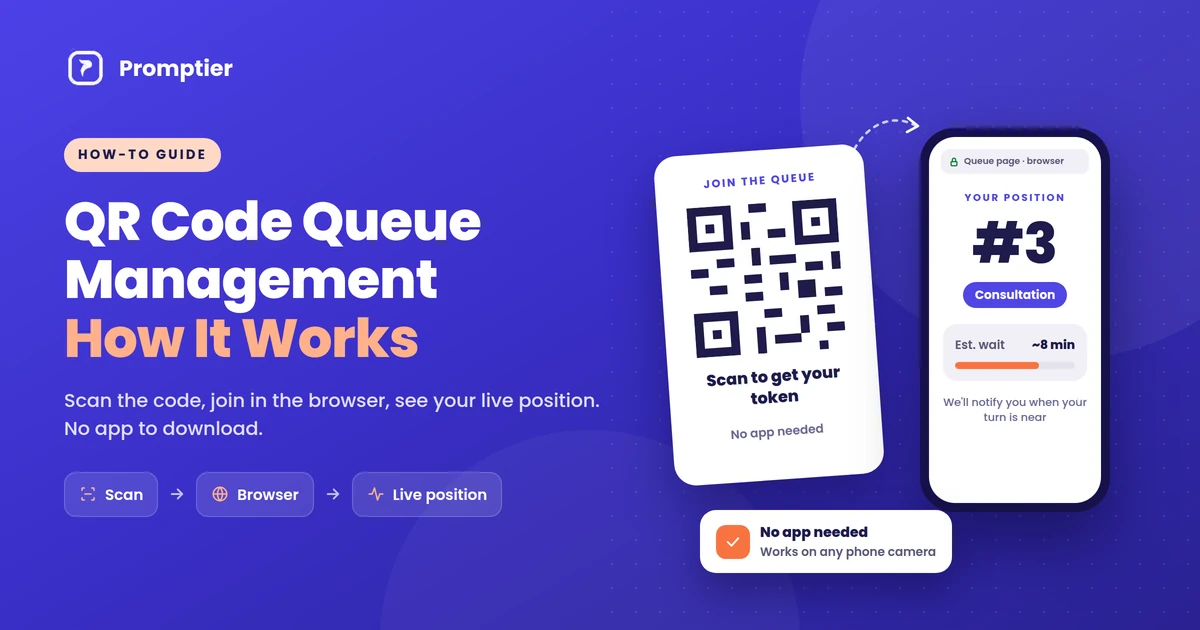
QR code queue management lets customers join a line by scanning a QR code with their phone camera. The queue opens in their phone’s browser, they see their live position, and they’re notified when it’s their turn. There’s no app to download, no token slip and no standing in line.
If you run a clinic, salon, bank branch or service counter, you’ve probably seen the moment it breaks down: a crowded waiting area, a receptionist answering “how much longer?” for the tenth time, and a paper token nobody can track. A QR code queue fixes that with a printed code and the phone already in your customer’s pocket.
This guide explains exactly how it works, from the scan to the moment a customer is called, and what to look for when you set it up.
QR code queue management works in four steps. A customer scans a QR code at your entrance. A queue page opens in their phone browser, with no app needed. They pick a service and join, then see their live position and estimated wait. When staff call the next customer from a dashboard, everyone’s position updates and the customer is notified as their turn nears.
Key Takeaways
- QR code queue management replaces token machines and paper registers with a printed QR code and the customer’s own phone.
- No app is needed. Modern phone cameras read QR codes and open the queue as a web page in the browser.
- Customers see their live position and estimated wait, and are notified as their turn approaches, so they can wait anywhere.
- Staff run the queue from a dashboard on any phone or laptop, and every scan is timestamped for wait-time reports.
- It suits India particularly well: UPI recorded 24.51 billion transactions in August 2026 alone, so scanning a QR code is already a daily habit for most customers.
What Is QR Code Queue Management?
QR code queue management is a way of running a waiting line where customers join by scanning a QR code instead of taking a paper token or standing in a physical line. The QR code links to a web page for your queue. Once a customer joins, their position is tracked digitally, updated in real time, and shown on their own phone.
It’s a type of virtual queue: the customer holds a place in line without physically standing in it. The difference from older virtual queues is the entry point. Instead of downloading an app or calling a number, the customer just points their camera at a code.
Key terms used in this guide:
- QR code: a square barcode that stores a web address. Phone cameras can read it and open that address.
- Virtual queue: a queue where people hold their place digitally and can wait anywhere.
- Live position: the customer’s current place in the queue, updated every time staff call someone.
- Staff dashboard: the screen staff use to see who’s waiting and call the next customer.
- Queue display: a TV or monitor showing the token or name being served now.
How QR Code Queue Management Works, Step by Step
Here is the full journey, from the business printing a code to the customer being served.
Step 1: The business puts up a QR code
The business creates its queue, adds its services (for example, “Consultation” and “Reports”, or “Haircut” and “Colour”), and prints the QR code. It goes at the entrance, the reception desk and anywhere customers naturally stop. One printed code can be used every day.
Step 2: The customer scans it with their phone camera
The customer opens their phone camera and points it at the code. Built-in camera apps on iPhones and most Android phones recognise QR codes automatically and show a link to tap. Customers who use Google Lens or a UPI app’s scanner can use that too.
Step 3: The queue opens in the browser, not an app
Tapping the link opens the business’s queue page in the phone’s browser, such as Chrome or Safari. Nothing is downloaded or installed. There’s no app store, no sign-up and no password.
Step 4: The customer joins the queue
The customer picks the service they need and enters minimal details, usually a name and sometimes a phone number, so staff know who to call. They tap to join and get a place in the queue, often shown as a token number.
Step 5: They see their live position and wait anywhere
The page now shows the customer’s live position and estimated wait. Because the page stays connected to the queue, it updates on its own every time staff call someone. The customer can sit down, grab a coffee or step outside, instead of hovering near the counter.
Step 6: Staff call next, and the customer is notified
At the counter, staff see everyone waiting on a dashboard on their phone, tablet or laptop, and tap to call the next person. Every waiting customer’s position moves up at once, the lobby TV (if you use one) shows who’s being served, and the customer gets a notification on their phone as their turn approaches.
Step 7: The visit is logged
Each step is timestamped: when the customer scanned, when they were called and when they were served. Over time, that gives the business real data on average waits, peak hours and busy services, with no manual logging.
What Happens Behind the Scan
A QR code doesn’t contain the queue itself. It holds a short web address. Everything after the scan happens on a normal secure web page (HTTPS), which is why no app is needed.
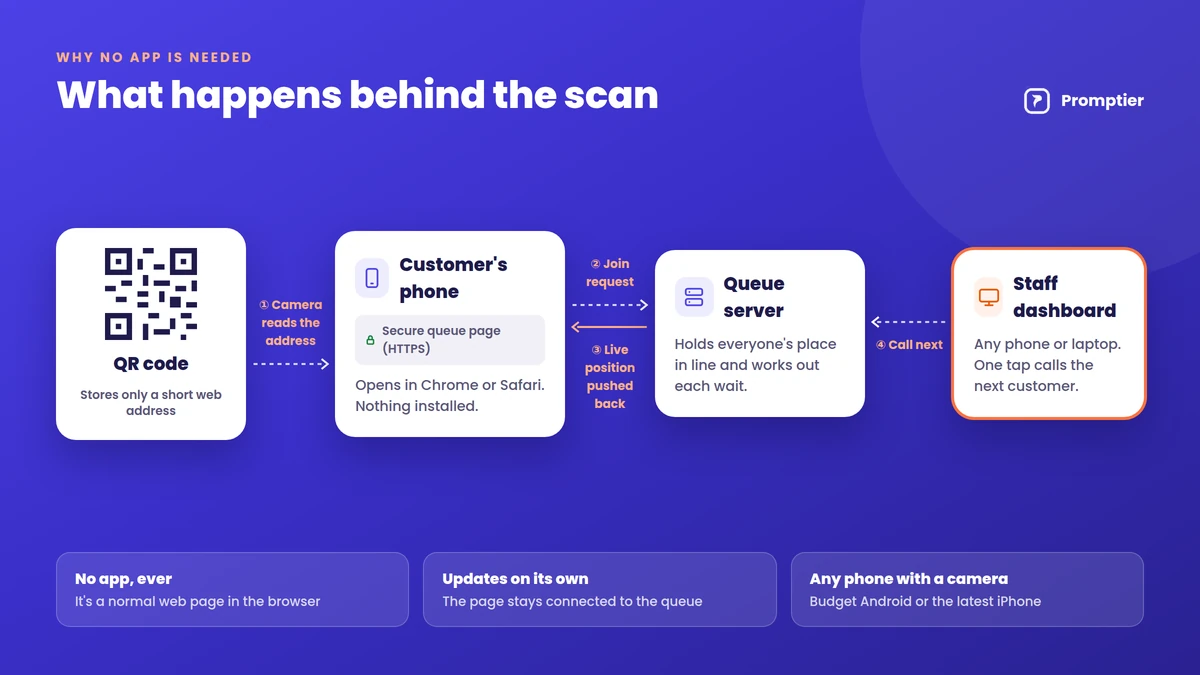
- The camera decodes the code and reads the web address stored in it.
- The browser opens the address, loading the business’s queue page for that location.
- The page registers the customer in the queue on the queue provider’s server and gives them a place.
- The page stays connected, so when staff call the next person, the new position is pushed to every waiting customer’s screen.
- A notification is triggered when the customer is near the front, depending on the system and the phone’s settings.
Because all of this runs in the browser, it works the same on a ₹8,000 Android phone and the latest iPhone, as long as the phone has a camera and a data connection.
Why “No App Needed” Matters
The biggest reason QR queues work is that they ask almost nothing of the customer. A queue app has to be found, downloaded, installed, opened and signed into before anyone can join a line. Most people visiting a clinic or service centre once a month won’t do that. A QR code takes one scan.
- No storage or data used for an app. This matters on budget phones with limited space.
- No account or password. Customers join in seconds, even on their first visit.
- It works for occasional visitors. Nobody installs an app for a place they visit twice a year.
- Scanning is already a habit in India. UPI recorded 24.51 billion transactions in August 2026 (Business Standard, citing NPCI), and a large share of those start with a QR scan at a shop counter. Customers who pay by scanning already know how to join a queue by scanning.
What the Customer Sees vs What Staff See
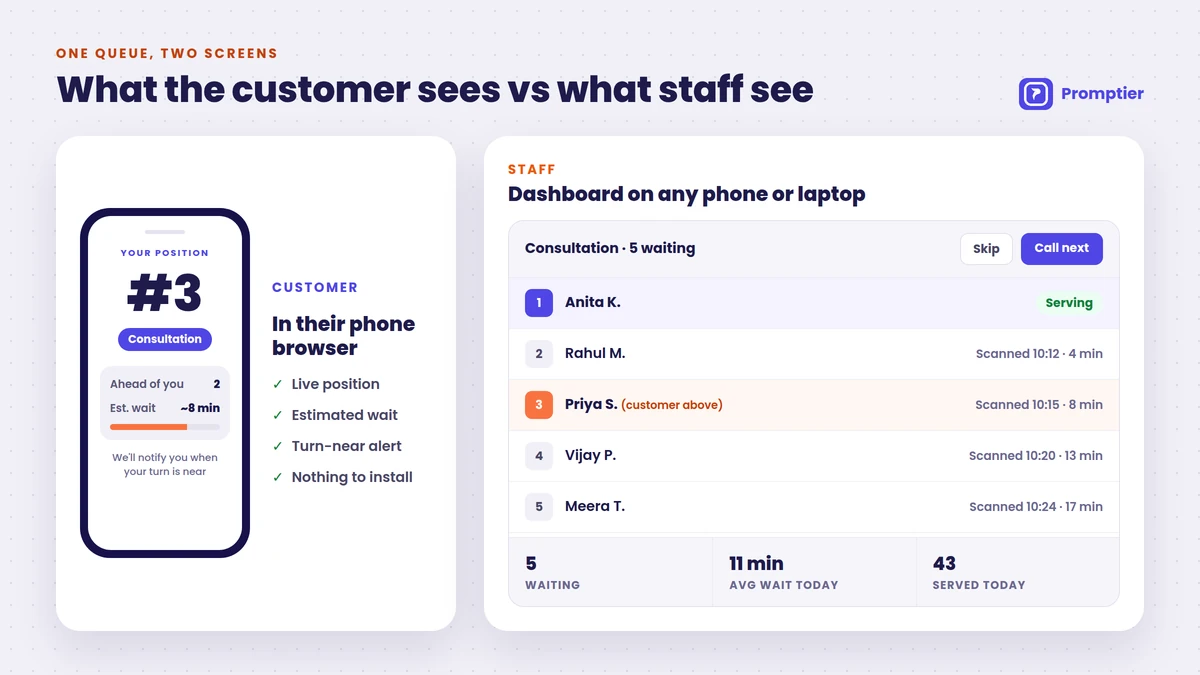
| Customer (phone browser) | Staff (dashboard) | |
|---|---|---|
| Joining | Scan QR, pick a service, tap to join | New entries appear automatically |
| During the wait | Live position and estimated wait | Full list of who’s waiting, per service |
| Being called | Notification as their turn nears | One tap to call next or skip |
| Afterwards | Nothing to uninstall | Timestamped record, wait-time reports |
| Needs | A phone with a camera and data | Any phone, tablet or laptop |
QR Code Queue vs Token Machine vs Queue App
| Token machine | Queue app | QR code queue | |
|---|---|---|---|
| How customers join | Press a button, take a paper slip | Download app, sign up, join | Scan a QR code, join in the browser |
| Hardware | Dispenser, printer, paper rolls | None | None (a printed code) |
| Customer sees live position | No, just a number | Yes | Yes |
| Can wait away from the counter | No | Yes | Yes |
| Works for first-time visitors | Yes | Rarely (app download needed) | Yes |
| Wait-time data | Usually none | Yes | Yes, every scan timestamped |
| Typical setup | Vendor installation | Varies | Same day |
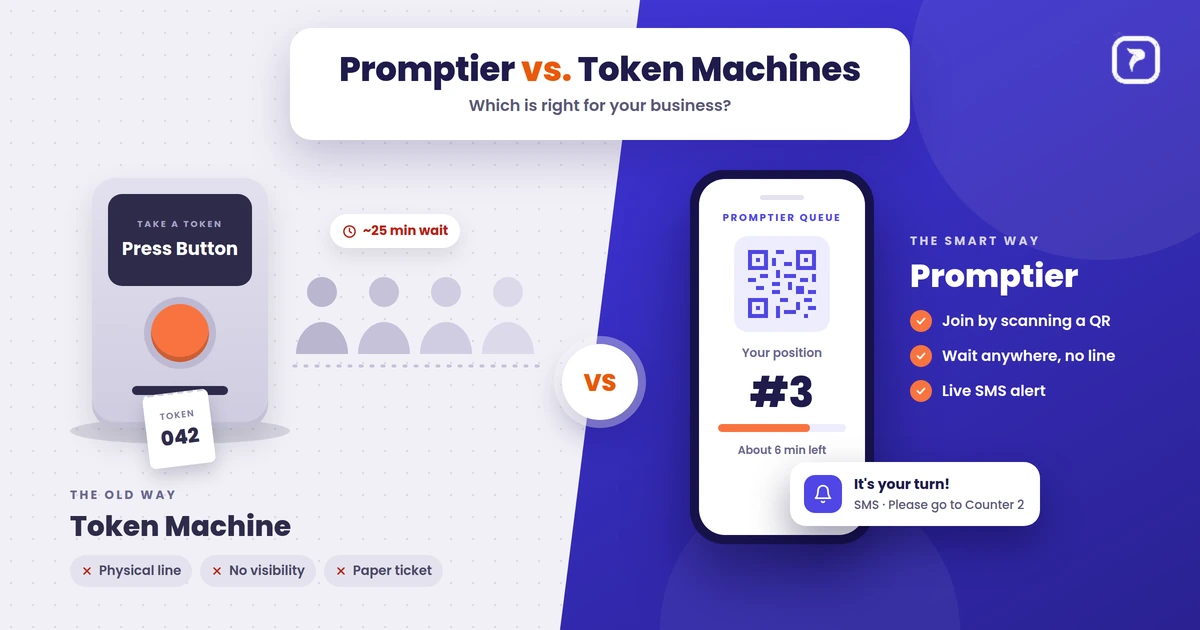
A token machine gives everyone a number but no visibility. A queue app gives visibility but loses most people at the download step. A QR code queue gives the visibility of an app with the ease of a token. If you’re comparing costs, see our token machine vs digital queue cost comparison.
Where QR Code Queue Management Works Best
It fits anywhere people arrive without a fixed slot and wait to be served:
- Clinics and hospital OPDs: patients wait in the car or cafeteria instead of a crowded corridor. See hospital queue management.
- Banks and NBFCs: separate QR queues for cash, loans and enquiries.
- Salons and barbershops: walk-ins join from the door and come back when their chair is ready.
- Service centres and government offices: long waits become manageable when people aren’t stuck in one room.
- Restaurants and cafés: a waitlist for tables that guests can leave and come back to.
How to Set Up a QR Code Queue
Most businesses can go live the same day with a QR queue system like Promptier:
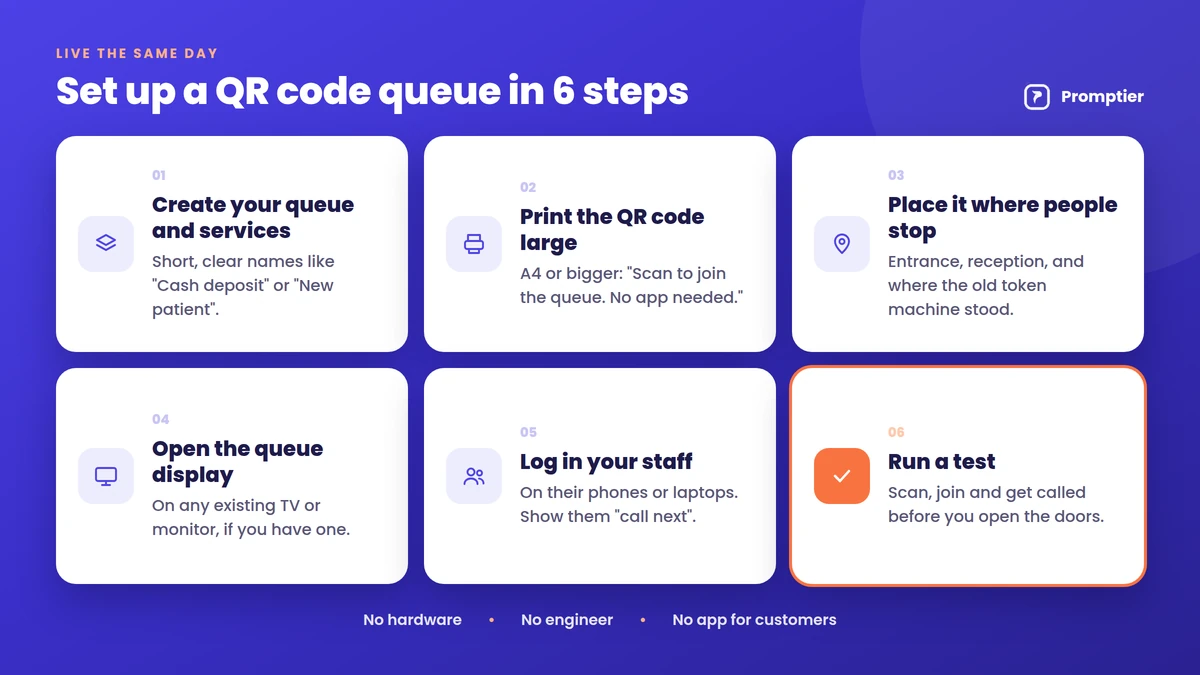
- Create your queue and services. Keep service names short and clear, like “Cash deposit” or “New patient”.
- Print the QR code large. A4 or bigger, with one line underneath: “Scan to join the queue. No app needed.”
- Place it where people stop, at the entrance, reception and wherever your old token machine stood.
- Open the queue display on an existing TV or monitor, if you have one.
- Log in your staff on their phones or laptops and show them “call next”.
- Run a test: scan, join and get called before you open the doors.
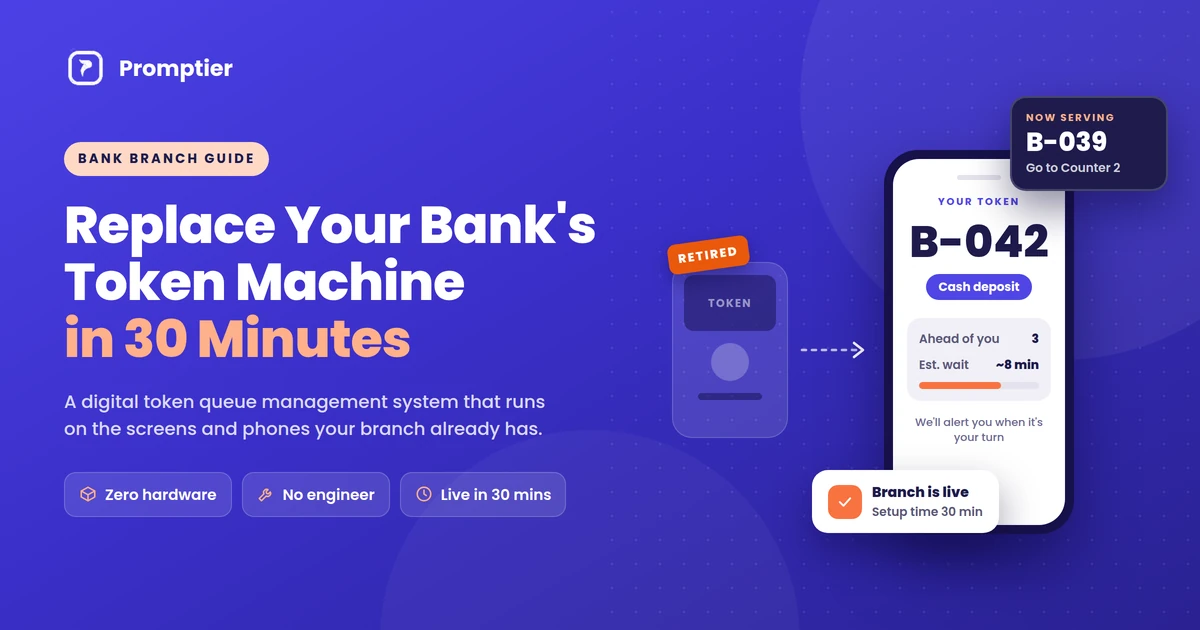
For a bank branch walkthrough with timings, see how to replace your bank’s token machine with a digital system.
Common Concerns, Answered
“Some of my customers don’t have smartphones.”
Keep a staffed desk or a tablet at reception where staff can add walk-ins to the same queue on the customer’s behalf. Everyone ends up in one line, however they joined.
“What if the internet is slow?”
The queue page is light and needs only a basic mobile data connection. For the business side, keep a simple fallback, such as a paper register, for outages.
“Is it safe for customers to scan a QR code?”
A QR code only opens a web address. Customers should check that the page belongs to your business before entering details. Use a branded, laminated code, and check it regularly so no one has stuck a fake code over it.
“What data do customers share?”
Usually just a name and sometimes a phone number, only what’s needed to call them. In India, that’s personal data under the DPDP Act, 2023, so show a short notice explaining how it’s used.
“What if a customer’s phone battery dies?”
They can tell the front desk their name or token number, and staff can find them in the dashboard.
How Promptier Handles QR Queues
Promptier is a QR code queue management system built for Indian businesses. It runs on the phones, laptops and screens you already have.
- Scan and join in the browser. Customers point their camera at your QR code and join with a tap. No app store, no download, no sign-up wall.
- Live position and estimated wait. The estimate updates in real time, and customers are notified as their turn approaches.
- Staff dashboard on any device. Call next, skip, and see who’s waiting at a glance.
- Queue display on any TV. Show the queue on an existing smart TV or monitor.
- Timestamped data. Every scan is logged automatically, with average waits and peak hours.
- Pricing. Free to start. The Pro plan is ₹499 per month per location. No hardware to buy.
See how Promptier’s QR queue system works
Frequently Asked Questions
What is QR code queue management?
QR code queue management is a way of running a waiting line where customers join by scanning a QR code with their phone. The queue opens in their browser, shows their live position and estimated wait, and notifies them when their turn is near. It replaces paper tokens and physical lines.
Do customers need to download an app to join a QR code queue?
No. The QR code opens a web page in the phone’s browser, such as Chrome or Safari. Customers join there with a tap. There’s nothing to download, install or sign up for.
How does a customer know when it’s their turn?
The queue page shows their live position and estimated wait, updating each time staff call someone. As their turn approaches, they get a notification on their phone, and the lobby TV, if used, shows who’s being served.
Does a QR code queue work on all phones?
It works on any smartphone with a camera and a data connection. Built-in camera apps on iPhones and most Android phones read QR codes directly, and Google Lens or a UPI app’s scanner works too.
What if a customer doesn’t have a smartphone?
Staff can add them to the same queue from the front desk or a reception tablet. They wait in the same line as everyone else and are called by name or token number.
How much does a QR code queue management system cost?
It’s much cheaper than hardware. Promptier is free to start, and its Pro plan costs ₹499 per month per location. There’s no dispenser, kiosk or paper to buy, because the only physical item is a printed QR code.
How long does it take to set up?
Most businesses go live the same day. You create your services, print the QR code, open the dashboard on an existing phone or laptop and run a test scan.
Conclusion
QR code queue management works because it removes every step customers resist. There’s no app to download, no account to create and no line to stand in: just a scan, a browser page and a live position that updates on its own. Businesses get a calmer waiting area and real wait-time data, and all they have to install is a printed code.
Ready to try it? See how the Promptier QR queue system works and book a free demo, or explore Promptier for hospitals, banks and service businesses. No credit card, no hardware, support in IST hours.
Related reading
See it work in your OPD
Book a free demo and we'll show you how QR-based queuing fits your existing screens and workflow — no app, no new hardware.
Book a Free Demo